Chapters
OOP Design principles
1. Don't repeat yourself
DRY is an acronym for Don’t Repeat Yourself. As the name suggests this principle focuses on reducing the duplication of the same code throughout the program. If you have the same block of code, performing the same tasks in multiple parts of the program, then it means that you are not following the DRY principle. The DRY principle can be implemented by refactoring the code such that it removes duplication and redundancy by creating a single reuseable code in the form of abstraction, or a function.
public class GFG {
    public static void main(String[] args)
    {
        // cerate 4x4 matrix with values
        int[][] matrix = { { 1, 2, 3, 4 },
                           { 5, 6, 7, 8 },
                           { 9, 10, 11, 12 },
                           { 13, 14, 15, 16 } };
        // print matrix
        System.out.println("Matrix1: ");
        for (int i = 0; i < 4; i++) {
            for (int j = 0; j < 4; j++) {
                System.out.print(matrix[i][j] + " ");
            }
            System.out.println();
        }

        // create 5x5 matrix with values
        int[][] matrix2 = { { 1, 2, 3, 4, 5 },
                            { 6, 7, 8, 9, 10 },
                            { 11, 12, 13, 14, 15 },
                            { 16, 17, 18, 19, 20 },
                            { 21, 22, 23, 24, 25 } };
        // print matrix
        System.out.println("Matrix2: ");
        for (int i = 0; i < 5; i++) {
            for (int j = 0; j < 5; j++) {
                System.out.print(matrix2[i][j] + " ");
            }
            System.out.println();
        }
    }
}
public class GFG {
// print matrix method
private void printMatrix(int[][] matrix)
{
int n = matrix.length;
int m = matrix[0].length;
for (int i = 0; i < n; i++) {
for (int j = 0; j < m; j++) {
System.out.print(matrix[i][j] + " ");
}
System.out.println();
}
}
public static void main(String[] args)
{
GFG obj = new GFG();
// cerate 4x4 matrix with values
int[][] matrix = { { 1, 2, 3, 4 },
{ 5, 6, 7, 8 },
{ 9, 10, 11, 12 },
{ 13, 14, 15, 16 } };
// print matrix
System.out.println("Matrix1: ");
obj.printMatrix(matrix);
// create 5x5 matrix with values
int[][] matrix2 = { { 1, 2, 3, 4, 5 },
{ 6, 7, 8, 9, 10 },
{ 11, 12, 13, 14, 15 },
{ 16, 17, 18, 19, 20 },
{ 21, 22, 23, 24, 25 } };
// print matrix
System.out.println("Matrix2: ");
obj.printMatrix(matrix2);
}
}2. Open-Closed principle
OCP is an acronym for Open Closed Principle, it is also considered as a basic principle of OOPs. According to this principle, all the entities, like classes, methods, etc, should be open for extensions but closed for modifications. This means that you have to keep your code open for extending the behavior, but it should not allow modification of the existing source code.
class Calculator {
    public double calculate(double a, double b,
                            char operator)
    {
        switch (operator) {
        case '+':
            return a + b;
        case '-':
            return a - b;
        }
        return 0.0;
    }
}
public class GFG {
    public static void main(String args[])
    {
        Calculator obj = new Calculator();
        System.out.println(obj.calculate(10, 20, '+'));
        System.out.println(obj.calculate(10, 20, '-'));
    }
}
interface Arithmetic {
double perform(double a, double b);
}
// using arithmetic interface to implement addition
class Addition implements Arithmetic {
public double perform(double a, double b)
{
return a + b;
}
}
// using arithmetic interface to implement substraction
class Substraction implements Arithmetic {
public double perform(double a, double b)
{
return a - b;
}
}
class Calculator {
public double calculate(Arithmetic arithmetic, double a,
double b)
{
return arithmetic.perform(a, b);
}
}
public class GFG {
public static void main(String[] args)
{
Calculator obj = new Calculator();
System.out.println(
obj.calculate(new Addition(), 10, 20));
System.out.println(
obj.calculate(new Substraction(), 10, 20));
}
}3. Single Responsibility Principle
SRP is an acronym for Single Responsibility Principle. This principle suggests that a `Class` should have only one reason to change. This means that a `Class` should only implement one functionality and only change when there is a need to change the functionality. If a class has too many responsibilities, it becomes difficult to manage in the long run. With SRP the classes become more modular and focused, leading to a more maintainable and flexible code.
class User {
    String name;
    String email;

    public User(String name, String email)
    {
        this.name = name;
        this.email = email;
    }

    public void showUser()
    {
        System.out.println("Name: " + this.name);
        System.out.println("Email: " + this.email);
    }

    public void sendEmail(String message)
    {
        System.out.println("Email sent to " + this.email
                           + " with message: " + message);
    }

    public void saveToFile()
    {
        System.out.println("Saving user to file...");
    }
}

// driver code
public class GFG {
    public static void main(String[] args)
    {
        User user1 = new User("John Doe", "john@gfg.com");
        user1.showUser();
        user1.sendEmail("Hello John");
        user1.saveToFile();
    }
}
class User {
String name;
String email;
public User(String name, String email)
{
this.name = name;
this.email = email;
}
public void showUser()
{
System.out.println("Name: " + this.name);
System.out.println("Email: " + this.email);
}
}
// email service class to send email
class EmailService {
public void sendEmail(User user, String message)
{
System.out.println("Email sent to " + user.email
+ " with message: " + message);
}
}
// file service class to save to file
class FileService {
public void saveToFile(User user)
{
System.out.println("Saving user to file...");
}
}
// driver code
public class GFG {
public static void main(String[] args)
{
User user = new User("John Doe", "john@gfg.com");
user.showUser();
EmailService emailService = new EmailService();
emailService.sendEmail(user, "Hello John");
FileService fileService = new FileService();
fileService.saveToFile(user);
}
}4. Interface Segregation Principle
ISP is an acronym for Interface Segregation Principle. The principle states that clients should not forcefully implement an Interface if it does not use that. This means that the class should not implement an interface if the methods declared by the interface are not used by the class. Similar to SRP, this principle states that one should focus on creating multiple client interfaces responsible for a particular task, rather than having a one-fat interface.
interface Animal{
   public void breath();
    public void fly();
    public void swim();
}

class Fish implements Animal{
    public void swim(){
        System.out.println("Fish swims");
    }
    public void fly(){
        // Fish cannot fly
    }
}
interface Animal {
// only method common in all animal implementations
public void breath();
}
// rather than Animal interface, we use waterAnimal and
// AirAnimal interface
interface WaterAnimal {
public void swim();
}
interface AirAnimal {
public void fly();
}
class Fish implements WaterAnimal {
public void swim() {
System.out.println("Fish swims");
}
}5. Liskov Substitution Principle
LSP is an acronym for Liskov Substitution Principle. According to the principle, Derived classes must be substitutable for their base classes. This indicates that superclass objects in the program should be interchangeable by instances of their subclasses without compromising the program’s correctness. It guarantees that any child class of a parent class can be used in place of their parent without causing any unexpected behavior.
class Rectangle {
    int length;
    int width;
    void setLength(int l) {
        length = l;
    }
    void setWidth(int w) {
        width = w;
    }
    int area() {
        return length * width;
    }
}

// square class inherited from rectangle
class Square extends Rectangle {
    void setLength(int l) {
        length = l;
        width = l;
    }
    void setWidth(int w) {
        length = w;
        width = w;
    }
}

// driver code
public class GFG {
    public static void main(String[] args) {
        Rectangle obj = new Square();
        obj.setLength(5);
        obj.setWidth(10);
        System.out.println(obj.area());
    }
}
interface Shape{
void setLength(int l);
void setWidth(int w);
int area();
}
class Rectangle implements Shape{
int length;
int width;
public void setLength(int l) {
length = l;
}
public void setWidth(int w) {
width = w;
}
public int area() {
return length * width;
}
}
public class GFG {
public static void main(String[] args) {
Shape obj = new Rectangle();
obj.setLength(5);
obj.setWidth(10);
System.out.println(obj.area());
}
} 6. Dependency Inversion Principle
DIP is an acronym for Dependency Inversion Principle. The principle states that high-level classes should not depend on low-level classes, instead, both should depend on Abstractions. In other words, the modules/classes should depend on Abstractions, (interfaces and abstract classes) rather than concrete implementation. By introducing an abstract layer, DIP aims in reducing the coupling between the classes and hence make the application more easier to test and maintain.
class Computer {
    public void boot() {
        System.out.println("Booting the computer...");
    }
}

class User {
    public void startComputer() {
        Computer computer = new Computer();
        computer.boot();
    }
}
public class GFG {
    public static void main(String[] args) {
        User user = new User();
        user.startComputer();
    }
}
interface IComputer {
void boot();
}
class Computer implements IComputer {
public void boot()
{
System.out.println("Booting the computer...");
}
}
class User {
public void startComputer(IComputer computer)
{
computer.boot();
}
}
public class GFG {
public static void main(String[] args)
{
User user = new User();
Computer computer = new Computer();
user.startComputer(computer);
}
}7. Composition Over Inheritance
COI is an acronym for Composition Over Inheritance. As the name implies, this principle emphasizes using Composition instead of Inheritance to achieve code reusability. Inheritance allows a subclass to inherit its superclass’s properties and behavior, but this approach can lead to a rigid class hierarchy that is difficult to modify and maintain. In contrast, Composition enables greater flexibility and modularity in class design by constructing objects from other objects and combining their behaviors. Additionally, the fact that Java doesn’t support multiple inheritances can be another reason to favor Composition over Inheritance.
class Musician {
    public void play() {
        System.out.println("play");
    }
}

class Singer extends Musician {
    public void sing() {
        System.out.println("sing");
    }
}

class Drummer extends Musician {
    public void drum() {
        System.out.println("drum");
    }
}
class Singer {
public void sing() {
System.out.println("sing");
}
}
class Drummer {
public void drum() {
System.out.println("drum");
}
}
class SingerDrummer {
Singer singer = new Singer();
Drummer drummer = new Drummer();
public void play() {
singer.sing();
drummer.drum();
}
} Java Object-Oriented Programming Concepts
1. Data Abstraction
Data Abstraction is the property by virtue of which only the essential details are displayed to the user. The trivial or non-essential units are not displayed to the user. Ex: A car is viewed as a car rather than its individual components.
Data Abstraction may also be defined as the process of identifying only the required characteristics of an object, ignoring the irrelevant details. The properties and behaviors of an object differentiate it from other objects of similar type and also help in classifying/grouping the object.
Key Points about Abstract Classes:
- An abstract method is a method that is declared without implementation.
- An abstract class may or may not have all abstract methods. Some of them can be concrete methods.
- A abstract method must always be redefined in the subclass, thus making overriding compulsory or making the subclass itself abstract.
- Any class that contains one or more abstract methods must also be declared with an abstract keyword.
- There can be no object of an abstract class. That is, an abstract class can not be directly instantiated with the new operator.
- An abstract class can have parameterized constructors and the default constructor is always present in an abstract class.
abstract class Geeks {
    abstract void turnOn();
    abstract void turnOff();
}

// Concrete class implementing the abstract methods
class TVRemote extends Geeks {
    @Override
    void turnOn() {
        System.out.println("TV is turned ON.");
    }

    @Override
    void turnOff() {
        System.out.println("TV is turned OFF.");
    }
}

// Main class to demonstrate abstraction
public class Main {
    public static void main(String[] args) {
        Geeks remote = new TVRemote();
        remote.turnOn();
        remote.turnOff();
    }
}
Abstract class
- Supports abstract and non-abstract methods
- Doesn't support multiple inheritance
- Can be extended by Java classes and multiple interfaces
- Class members can be private, protected, etc
Interface
- Can have abstract methods, default methods and static methods
- Supports multiple inheritance
- Can be extended by Java interface only
- Interfaces are public by default
Interfaces
Key Points about Interfaces:
- We can't create an instance (interface can't be instantiated) of the interface but we can make the reference of it that refers to the Object of its implementing class.
- A class can implement more than one interface.
- An interface can extend to another interface or interface (more than one interface).
- A class that implements the interface must implement all the methods in the interface.
- All the methods are public and abstract. All the fields are public, static, and final.
- It is used to achieve multiple inheritances.
- It is used to achieve loose coupling.
- Inside the Interface not possible to declare instance variables because by default variables are public static final.
- Inside the Interface, constructors are not allowed.
- Inside the interface main method is not allowed.
- Inside the interface, static, final, and private methods declaration are not possible.
interface testInterface {
    // public, static and final
    final int a = 10;

    // public and abstract
    void display();
}
Multiple Inheritance with Interfaces
// Add interface
interface Add {
    int add(int a, int b);
}

// Sub interface
interface Sub {
    int sub(int a, int b);
}

// Calculator class implementing Add and Sub
class Cal implements Add, Sub {
    // Method to add two numbers
    public int add(int a, int b) {
        return a + b;
    }

    // Method to sub two numbers
    public int sub(int a, int b) {
        return a - b;
    }
}
Default Methods
interface TestInterface {
    final int a = 10;

    default void display() {
        System.out.println("hello");
    }
}
Static Methods
interface TestInterface {
    final int a = 10;

    static void display() {
        System.out.println("hello");
    }
}
Extending Interfaces
interface A {
    void method1();
    void method2();
}

// B now includes method1 and method2
interface B extends A {
    void method3();
}
Development Process with Interfaces and Abstract Classes
In general, the development process is step by step:
- Level 1 - interfaces: It contains the service details.
- Level 2 - abstract classes: It contains partial implementation.
- Level 3 - implementation classes: It contains all implementations.
- Level 4 - Final Code / Main Method: It have access of all interfaces data.
// Level 1
interface Bank {
    void deposit();
    void withdraw();
    void loan();
    void account();
}

// Level 2
abstract class Dev1 implements Bank {
    public void deposit() {
        System.out.println("Your deposit Amount :" + 100);
    }
}

abstract class Dev2 extends Dev1 {
    public void withdraw() {
        System.out.println("Your withdraw Amount :" + 50);
    }
}

// Level 3
class Dev3 extends Dev2 {
    public void loan() {}
    public void account() {}
}

// Level 4
class Main {
    public static void main(String[] args) {
        Dev3 d = new Dev3();
        d.account();
        d.loan();
        d.deposit();
        d.withdraw();
    }
}| Class | Interface |
|---|---|
| In class, you can instantiate variables and create an object. | In an interface, you must initialize variables as they are final but you can't create an object. |
| A class can contain concrete (with implementation) methods | The interface cannot contain concrete (with implementation) methods. |
| The access specifiers used with classes are private, protected, and public. | In Interface only one specifier is used- Public. |
2. Encapsulation
It is defined as the wrapping up of data under a single unit. It is the mechanism that binds together the code and the data it manipulates. Another way to think about encapsulation is that it is a protective shield that prevents the data from being accessed by the code outside this shield.
Technically, in encapsulation, the variables or the data in a class is hidden from any other class and can be accessed only through any member function of the class in which they are declared. In encapsulation, the data in a class is hidden from other classes, which is similar to what data-hiding does. So, the terms "encapsulation" and "data-hiding" are used interchangeably.
Encapsulation can be achieved by declaring all the variables in a class as private and writing public methods in the class to set and get the values of the variables.
class Employee {
    private int empid;
    private String ename;

    // Setter methods
    public void set_id(int empid) {
        this.empid = empid;
    }

    public void set_name(String ename) {
        this.ename = ename;
    }

    // Getter methods
    public int get_id() {
        return empid;
    }

    public String get_name() {
        return ename;
    }
}
3. Inheritance
Inheritance is an important pillar of OOP (Object Oriented Programming). It is the mechanism in Java by which one class is allowed to inherit the features (fields and methods) of another class. We are achieving inheritance by using extends keyword. Inheritance is also known as "is-a" relationship.
Key Terminologies:
- Superclass: The class whose features are inherited is known as superclass (also known as base or parent class).
- Subclass: The class that inherits the other class is known as subclass (also known as derived or extended or child class). The subclass can add its own fields and methods in addition to the superclass fields and methods.
- Reusability: Inheritance supports the concept of "reusability", i.e. when we want to create a new class and there is already a class that includes some of the code that we want, we can derive our new class from the existing class. By doing this, we are reusing the fields and methods of the existing class.
class Bicycle {
    // the Bicycle class has two fields
    public int gear;
    public int speed;

    // the Bicycle class has one constructor
    public Bicycle(int gear, int speed) {
        this.gear = gear;
        this.speed = speed;
    }

    // the Bicycle class has three methods
    public void applyBrake(int decrement) {
        speed -= decrement;
    }

    public void speedUp(int increment) {
        speed += increment;
    }

    // toString() method to print info of Bicycle
    public String toString() {
        return ("No of gears are " + gear + "\n"
                + "speed of bicycle is " + speed);
    }
}

// derived class
class MountainBike extends Bicycle {
    // the MountainBike subclass adds one more field
    public int seatHeight;

    // the MountainBike subclass has one constructor
    public MountainBike(int gear, int speed, int startHeight) {
        // invoking base-class(Bicycle) constructor
        super(gear, speed);
        seatHeight = startHeight;
    }

    // the MountainBike subclass adds one more method
    public void setHeight(int newValue) {
        seatHeight = newValue;
    }

    // overriding toString() method of Bicycle to print more info
    @Override public String toString() {
        return (super.toString() + "\nseat height is " + seatHeight);
    }
}
Disadvantages of Inheritance in Java:
- Complexity: Inheritance can make the code more complex and harder to understand. This is especially true if the inheritance hierarchy is deep or if multiple inheritances is used.
- Tight Coupling: Inheritance creates a tight coupling between the superclass and subclass, making it difficult to make changes to the superclass without affecting the subclass.
4. Polymorphism
It refers to the ability of object-oriented programming languages to differentiate between entities with the same name efficiently. This is done by Java with the help of the signature and declaration of these entities. The ability to appear in many forms is called polymorphism.
sleep(1000); //millis
sleep(1000, 2000); //millis,nanos
1. Method Overloading
Also, known as compile-time polymorphism, is the concept of Polymorphism where more than one method share the same name with different signature(Parameters) in a class. The return type of these methods can or cannot be same.
2. Method Overriding
Also, known as run-time polymorphism, is the concept of Polymorphism where method in the child class has the same name, return-type and parameters as in parent class. The child class provides the implementation in the method already written.
class Parent {
    // Can't be overridden
    final void show() {}
}

class Child extends Parent {
    // This would produce error
    void show() {}
}
class Parent {
// Static method in base class which will be hidden in subclass
static void m1() {
System.out.println("From parent static m1()");
}
// Non-static method which will be overridden in derived class
void m2() {
System.out.println("From parent non-static(instance) m2()");
}
}
class Child extends Parent {
// This method hides m1() in Parent
static void m1() {
System.out.println("From child static m1()");
}
// This method overrides m2() in Parent
@Override public void m2() {
System.out.println("From child non-static(instance) m2()");
}
}
// Driver class
class Geeks {
public static void main(String[] args) {
Parent obj1 = new Child();
// here parents m1 called because static method cannot be overridden
obj1.m1();
// Here overriding works and Child's m2() is called
obj1.m2();
}
}
/* Output:
From parent static m1()
From child non-static(instance) m2() */
Private methods cannot be overridden as they are bonded during compile time. Therefore we can't even override private methods in a subclass.
Calling Parent Class Method
We can call the parent class method in the overriding method using the super keyword.
class Parent {
    void show() { System.out.println("Parent's show()"); }
}

// Inherited class
class Child extends Parent {
    // This method overrides show() of Parent
    @Override void show() {
        super.show();
        System.out.println("Child's show()");
    }
}

// Driver class
class Geeks {
    public static void main(String[] args) {
        Parent o = new Child();
        o.show();
    }
}
Overriding and Exception-handling
// Java program to demonstrate overriding when
// superclass method does not declare an exception

class Parent {
    void m1() { System.out.println("From parent m1()"); }
    void m2() { System.out.println("From parent m2()"); }
}

class Child extends Parent {
    @Override
    // no issue while throwing unchecked exception
    void m1() throws ArithmeticException {
        System.out.println("From child m1()");
    }

    @Override
    // compile-time error
    // issue while throwing checked exception
    void m2() throws Exception {
        System.out.println("From child m2");
    }
}
If the superclass overridden method does throw an exception, the subclass overriding method can only throw the same, subclass exception. Throwing parent exceptions in the Exception hierarchy will lead to compile time error. Also, there is no issue if the subclass overridden method does not throw any exception.
Exceptions
An Exception is an unwanted or unexpected event that occurs during the execution of a program (i.e., at runtime) and disrupts the normal flow of the program's instructions. It occurs when something unexpected things happen, like accessing an invalid index, dividing by zero, or trying to open a file that does not exist.
Java Exception Hierarchy
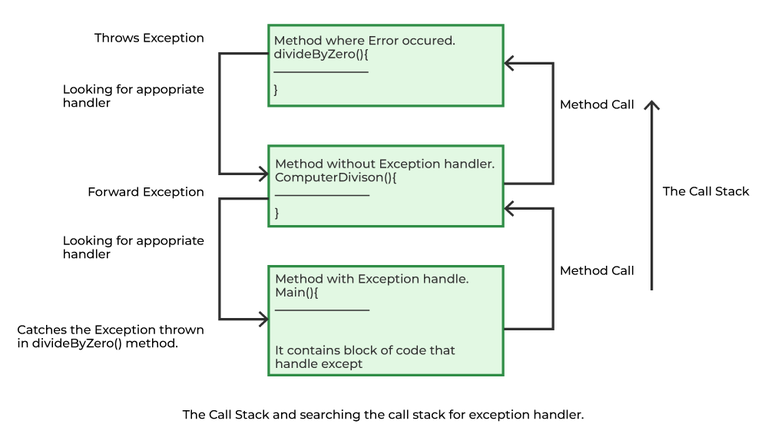
All exception and error types are subclasses of the class Throwable, which is the base class of the hierarchy. One branch is headed by Exception. This class is used for exceptional conditions that user programs should catch. NullPointerException is an example of such an exception. Another branch, Error is used by the Java run-time system(JVM) to indicate errors having to do with the run-time environment itself(JRE). StackOverflowError is an example of such an error.
Errors represent irrecoverable conditions such as Java virtual machine (JVM) running out of memory, memory leaks, stack overflow errors, library incompatibility, infinite recursion, etc. Errors are usually beyond the control of the programmer, and we should not try to handle errors.
1.1 Checked Exceptions
Checked exceptions are called compile-time exceptions because these exceptions are checked at compile-time by the compiler. Examples of Checked Exception are listed below:
- ClassNotFoundException: Throws when the program tries to load a class at runtime but the class is not found because its not present in the correct location or it is missing from the project.
- InterruptedException: Thrown when a thread is paused and another thread interrupts it.
- IOException: Throws when input/output operation fails
- InstantiationException: Thrown when the program tries to create an object of a class but fails because the class is abstract, an interface, or has no default constructor.
- SQLException: Throws when there's an error with the database.
- FileNotFoundException: Thrown when the program tries to open a file that doesn't exist
1.2 Unchecked Exceptions
The unchecked exceptions are just opposite to the checked exceptions. The compiler will not check these exceptions at compile time. In simple words, if a program throws an unchecked exception, and even if we didn't handle or declare it, the program would not give a compilation error. Examples of Unchecked Exception are listed below:
- ArithmeticException: It is thrown when there's an illegal math operation.
- ClassCastException: It is thrown when you try to cast an object to a class it does not belongs to.
- NullPointerException: It is thrown when you try to use a null object (e.g. accessing its methods or fields)
- ArrayIndexOutOfBoundsException: It occurs when we try to access an array element with an invalid index.
- ArrayStoreException: It happens when you store an object of the wrong type in an array.
- IllegalThreadStateException: It is thrown when a thread operation is not allowed in its current state
| Feature | Checked Exception | Unchecked Exception |
|---|---|---|
| Behaviour | Checked exceptions are checked at compile time. | Unchecked exceptions are checked at run time. |
| Base class | Derived from Exception | Derived from RuntimeException |
| Cause | External factors like file I/O and database connection cause the checked Exception. | Programming bugs like logical Errors cause the unchecked Exception. |
| Handling Requirement | checked exception must be handled using try-catch block or must be declared using throw keyword | No handling is required |
| Examples | IOException, SQLException, FileNotFoundException. | NullPointerException, ArrayIndexOutOfBoundsException, |
| Aspect | Error | Exception |
|---|---|---|
| Definition | An Error indicates a serious problem that a reasonable application should not try to catch. | Exception indicates conditions that a reasonable application might try to catch |
| Cause | Caused by issues with the JVM or hardware. | Caused by conditions in the program such as invalid input or logic errors. |
| Examples | OutOfMemoryError StackOverFlowError | IOException NullPointerException |
Default Exception Handling
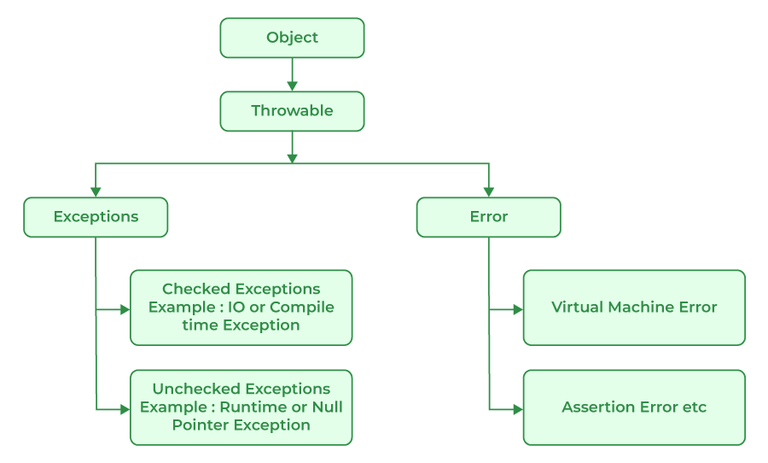
When an Exception occurs, the JVM Creates an exception object containing the error name, description, and program state. Creating the Exception Object and handling it in the run-time system is called throwing an Exception. There might be a list of the methods that had been called to get to the method where an exception occurred. This ordered list of methods is called Call Stack. Now the following procedure will happen.
- The run-time system searches the call stack for an Exception handler
- It starts searching from the method where the exception occurred and proceeds backward through the call stack.
- If a handler is found, the exception is passed to it.
- If no handler is found, the default exception handler terminates the program and prints the stack trace.
| Method | Description |
|---|---|
| printStackTrace() | Prints the full stack trace of the exception, including the name, message, and location of the error. |
| toString() | Prints exception information in the format of the Name of the exception. |
| getMessage() | Prints the description of the exception. |
class DivideByZeroException extends RuntimeException {
    public DivideByZeroException(String m) {
        super(m);
    }
}| Feature | throw | throws |
|---|---|---|
| Definition | It is used to explicitly throw an exception. | It is used to declare that a method might throw one or more exceptions. |
| Location | It is used inside a method or a block of code. | It is used in the method signature. |
| Usage | It can throw both checked and unchecked exceptions. | It is only used for checked exceptions. Unchecked exceptions do not require throws. |
| Responsibility | The method or block throws the exception. | The method's caller is responsible for handling the exception. |
| Flow of Execution | Stops the current flow of execution immediately. | It forces the caller to handle the declared exceptions. |
| Example | throw new ArithmeticException("Error"); | public void myMethod() throws IOException {} |
Lambda Expressions
You can implement interfaces with lambda
interface FuncInterface {
    // An abstract function
    void abstractFun(int x);

    // A non-abstract (or default) function
    default void normalFun() {
        System.out.println("Hello");
    }
}

class Test {
    public static void main(String args[]) {
        // lambda expression to implement above
        // functional interface. This interface
        // by default implements abstractFun()
        FuncInterface fobj = (int x)->System.out.println(2*x);

        // This calls above lambda expression and prints 10.
        fobj.abstractFun(5);
    }
}
arraylist.forEach(n -> System.out.println(n));
arraylist.forEach(n -> {
if (n % 2 == 0)
System.out.println(n);
});@FunctionalInterface
interface Functional {
int operation(int a, int b);
}
public class Test {
public static void main(String[] args) {
// Using lambda expressions to define the operations
Functional add = (a, b) -> a + b;
Functional multiply = (a, b) -> a * b;
// Using the operations
System.out.println(add.operation(6, 3)); // Output: 9
System.out.println(multiply.operation(4, 5)); // Output: 20
}
}
My simple library
Useful information in one spot. Not for beginners. Majority of stuff is extracted from GeeksForGeeks
Have fun I guess