Chapters
Bitwise operators in Java
Useful information and tricks for Java bit manipulation
Introduction to Bitwise Operators
Bitwise operators perform operations on integer data at the bit level. These operators are used to manipulate individual bits of a number and are extremely fast as they are implemented at the processor level.
Key Characteristics:
- Operate on individual bits of integer types (byte, short, int, long, char)
- Can be used with both signed and unsigned integers
- Much faster than arithmetic operations
- Commonly used in low-level programming, encryption, compression, etc.
Basic Bitwise Operators
1. Bitwise AND (&)
Performs a logical AND operation on each pair of corresponding bits.
| A | B | A & B |
|---|---|---|
| 0 | 0 | 0 |
| 0 | 1 | 0 |
| 1 | 0 | 0 |
| 1 | 1 | 1 |
int a = 5;    // 0101 in binary
int b = 3;    // 0011 in binary
int result = a & b;  // 0001 (1 in decimal)
System.out.println(result); // Output: 1
2. Bitwise OR (|)
Performs a logical OR operation on each pair of corresponding bits.
| A | B | A | B |
|---|---|---|
| 0 | 0 | 0 |
| 0 | 1 | 1 |
| 1 | 0 | 1 |
| 1 | 1 | 1 |
int a = 5;    // 0101
int b = 3;    // 0011
int result = a | b;  // 0111 (7 in decimal)
System.out.println(result); // Output: 7
Shift Operators
1. Left Shift (<<)
Shifts all bits to the left by a specified number of positions, filling with zeros on the right.
int num = 5;    // 0000 0101
int result = num << 2;  // 0001 0100 (20 in decimal)
System.out.println(result); // Output: 20
Note: Left shifting by n positions is equivalent to multiplying by 2n.
2. Right Shift (>>)
Shifts all bits to the right by a specified number of positions. For signed numbers, the sign bit is preserved.
int num = 20;    // 0001 0100
int result = num >> 2;  // 0000 0101 (5 in decimal)
System.out.println(result); // Output: 5

int negativeNum = -20;
result = negativeNum >> 2;  // preserves sign bit
System.out.println(result); // Output: -5
More Bitwise Operators
3. Bitwise XOR (^)
Performs a logical XOR (exclusive OR) operation on each pair of corresponding bits.
| A | B | A ^ B |
|---|---|---|
| 0 | 0 | 0 |
| 0 | 1 | 1 |
| 1 | 0 | 1 |
| 1 | 1 | 0 |
int a = 5;    // 0101
int b = 3;    // 0011
int result = a ^ b;  // 0110 (6 in decimal)
System.out.println(result); // Output: 6
4. Bitwise NOT (~)
Inverts all the bits of the operand (unary operator).
int num = 5;    // 0000 0101
int result = ~num;  // 1111 1010 (-6 in decimal)
System.out.println(result); // Output: -6
Note: The result of ~ is the two's complement of the inverted bits. For any integer n, ~n = -(n+1).
Unsigned Right Shift (>>>)
Shifts all bits to the right by a specified number of positions, filling with zeros on the left regardless of the sign.
int num = -20;    // 11111111 11111111 11111111 11101100
int result = num >>> 2;  // 00111111 11111111 11111111 11111011
System.out.println(result); // Output: 1073741819
Important: The unsigned right shift operator always fills with zeros, while the regular right shift operator preserves the sign bit. This makes a difference only for negative numbers.
Comparison of Shift Operators
| Operator | Name | Behavior |
|---|---|---|
| << | Left shift | Shifts bits left, fills with 0s |
| >> | Signed right shift | Shifts bits right, preserves sign bit |
| >>> | Unsigned right shift | Shifts bits right, fills with 0s |
Practical Applications
1. Checking if a number is even or odd
int num = 13;
if ((num & 1) == 0) {
    System.out.println("Even");
} else {
    System.out.println("Odd");
}
// Output: Odd
2. Swapping two numbers without temporary variable
int a = 5, b = 7;
a = a ^ b;
b = a ^ b;
a = a ^ b;
System.out.println("a = " + a + ", b = " + b);
// Output: a = 7, b = 5
3. Finding the number of set bits (Hamming weight)
int countSetBits(int n) {
    int count = 0;
    while (n > 0) {
        count += n & 1;
        n >>= 1;
    }
    return count;
}

System.out.println(countSetBits(15)); // 1111 → 4
System.out.println(countSetBits(16)); // 10000 → 1
4. Checking if a number is a power of 2
boolean isPowerOfTwo(int n) {
    return (n > 0) && ((n & (n - 1)) == 0);
}

System.out.println(isPowerOfTwo(16)); // true
System.out.println(isPowerOfTwo(15)); // false
5. Toggling a specific bit
int toggleBit(int num, int pos) {
    return num ^ (1 << pos);
}

// Toggle 3rd bit of 5 (0101 → 1101)
System.out.println(toggleBit(5, 3)); // 13
6. Adding without arithmetic operators
static int sum(int a, int b) {

        // Iterate till there is no carry
        while (b != 0) {

            // carry contains common set bits of a and b, left shifted by 1
            int carry = (a & b) << 1;

            // Update a with (a + b without carry)
            a = a ^ b;

            // Update b with carry
            b = carry;
        }
        return a;
    }
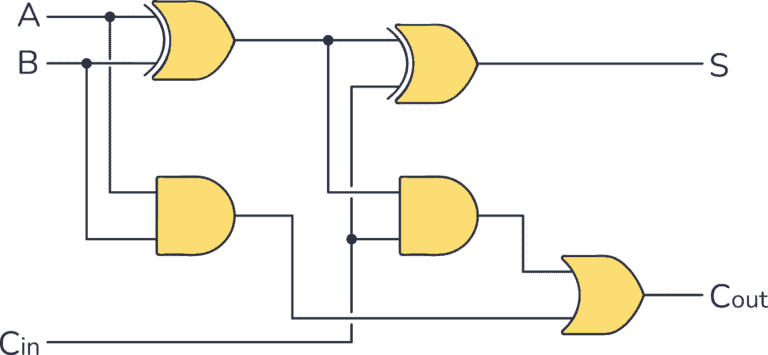
Full adder circuit
Can be used for SUB too
Bitwise Operator Precedence
Bitwise operators have the following precedence (from highest to lowest):
- ~ (Bitwise NOT)
- <<, >>, >>> (Shift operators)
- & (Bitwise AND)
- ^ (Bitwise XOR)
- | (Bitwise OR)
Best Practice: Use parentheses to make complex bitwise expressions clearer and to ensure the desired order of operations.
int a = 1, b = 2, c = 3;
int result1 = a | b & c;    // Equivalent to a | (b & c)
int result2 = (a | b) & c;  // Different from above

System.out.println(result1); // 3
System.out.println(result2); // 1
My simple library
..of useful code